Showing posts with label Suggestions. Show all posts

Monday, September 6, 2010

Make Your Blog More Better

As you know, Techie Vinayak’s main motive is to make YOUR blog better. And as I have tried both wordpress.org and blogger.com I know that wordpress.org definitely makes your blog look more good. Here are some advantages of a Wordpress blog than a free blog:-
  • You can customize your blog’s design with own premium themes.
  • You can enrich your blog’s features with thousands of free third party plugins.
  • Your own your blog content and backup is available.
  • You are free to put advertisements on your blog.
  • You can enhance your blog SEO (Search Engine Optimization) easily with plugins.
wpwh-giveaway-530x200
Don’t you think that you should now shift your blog to WordPress. Oh…you need a domain, a web hosting :-( and you don’t want to spend your money at that. But now don’t take tension about that because WPWebHost will be taking care of all that.

WHATS THE PRIZE?

1 year Rookie Plan with FREE domain name (1GB space | 5GB/mo bandwidth)

HOW TO WIN?

  1. Blog about this contest and link back to this post. You could take a banner here and insert to your post.
  2. Get 7 comments for your post. (Trackback isn’t counted)
  3. Submit your blog post URL through comment below, along with your name and valid email address in the provided fields.
  4. Yippee! You have just won a FREE WordPress hosting plan + a domain name. We will email you further steps to claim the prize within 2 weeks.

TERMS AND CONDITIONS

  • Every participant is entitled to only one prize.
  • This giveaway ends on 30 Sep 2010.
  • WPWebHost reserves the right to amend or revise the terms and conditions of this promotion without prior notice.
  • WPWebHost has the right to disqualify any participation which does not fulfill the requirements.
So take my advice and participate in this contest. Here is the link - Self-Host Your Blog Giveaway: Win FREE Self-Hosted WordPress Hosting + Domain Name

Wednesday, August 18, 2010

Create A Contact Me Form For Blogger

A “Contact Me” page is a must for every blogger. Many people create a contact me page and give their email addresses and other ways by which the reader can contact you. But, a contact form gives your site a little more professional look. To see my “Contact Form” click here. To get this contact form, you just need to open EmailMeForm. You can create your own contact form. You can also choose from the existing forms and then edit them. This is a must use website. After creating the contact form, go to your blogger dashboard and create a new page. I suggest to you to keep the title of the page as “Contact Me”. Then, in the page editor, click Edit Html and paste the EMBED html code you got from EmailMeForm.

This helps a lot. So do try it.

Sunday, August 15, 2010

Why You Should Use Template Designer?

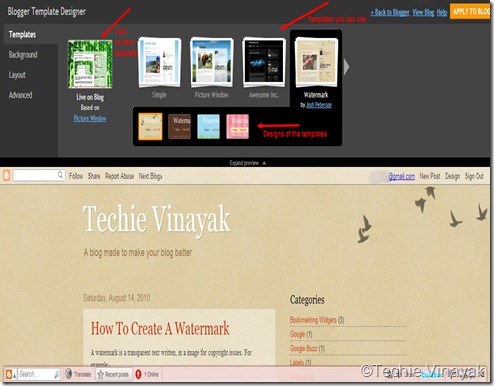
Blogger’s template designer is a feature which you should definitely use. The template designer can be found in the Design option. Even I have got this template from the template designer.
td1
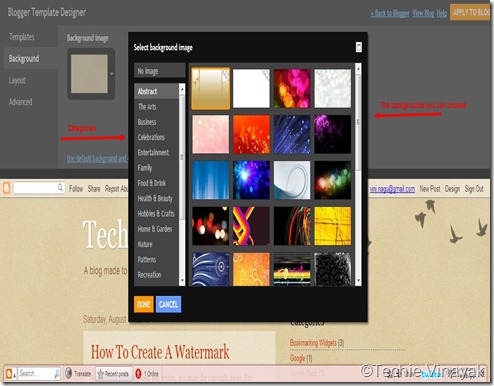
Firstly, choose the template you want for your blog. Then you need to design it. You can also choose different ready-made designs of the template. You can even choose different backgrounds for your blog.
td2
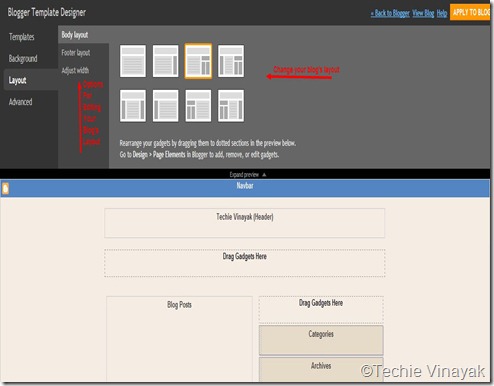
You can even change your blog’s layout. There are 8 options for changing your blog’s layout.
td3
Now, the best tab of the template designer. The Advanced tab. This tab has many features such as changing your font, text colour etc.
td4
So, those were the features of the template designer, I surely suggest you to give it a try and I am sure you will love it. Try it once and tell me how was the experience.